
Does it make sense to build your own company brain? One place that holds everything the company knows about its clients, projects and money, and where artificial intelligence can work with all of it. Maybe. We tried it at Mediatoring. Here’s how we went about it, what it gives us and what it cost.
I work with artificial intelligence every day, and for a long time I kept hitting the same wall. ChatGPT or Claude will write me a nice e-mail, but it has no idea that the client has been waiting three weeks for a quote, that they didn’t pay last month’s invoice, or that we agreed on a different date over the phone. All of this was scattered. Tasks lived in Freelo, requests came in through Gmail, invoices were issued in Fakturoid, the newsletter went out via Mailchimp, quotes were spread across e-mail, Word and Google Drive, and the context was usually in someone’s head. That’s not a sustainable model in the long run.
So we started programming our own CRM at the company – a single place where everything would come together. The result was an application that essentially replicated our existing tools and services. Projects, tasks, mail, time tracking and a calendar all came together there; it even had a public portal for customers. A custom module for selling e-books, a hosting registry, invoicing and even travel orders. The app was written in PHP and hosted on a server, so practically anyone in the company had access to it. Development took about two months, and in the end it became such a behemoth that I sometimes had to open Cursor, which I used for development, just to ask the AI assistant where to find a particular feature.
The biggest problem was tasks, so I built a simple Python app, separately and only on my own computer, vaguely similar to Trello. A board with 3 columns – To Do · Doing · Done. After a few days I added routing of tickets from the website and from e-mail, and new things from outside got their own column. A week later came a Someday Maybe column. And a week after that, Waiting – the first semi-automated column, where a thread moved whenever we were waiting for the client to reply. Two months later this had grown into a workflow of its own, driven by whether the other side replies to a task/e-mail/lead/ticket or not.
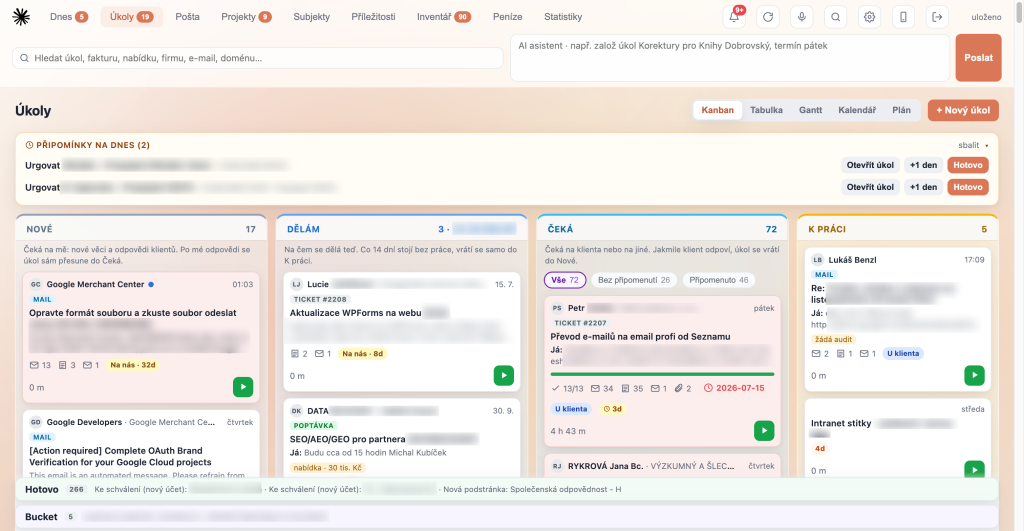
The current setup has the columns New · Doing · Waiting · To Do, with the Done · Bucket states tucked away in the footer. Above it all sit Reminders of what needs to be done today.
The tool changed as it adapted to the company. From a generic Trello “just on my Mac”, the app moved to its own VPS and became an interactive board organised by who is supposed to respond in the conversation: new from the client, in progress, waiting for the other side…
The original system is technically still running, but to be honest I haven’t been in it for several weeks. The little three-column to-do app has become the company’s memory, holding each client’s entire history. All the threads come together, so every important e-mail from a customer and every enquiry from the website ends up there. New enquiries either land directly in the CRM if they’re sent to a dedicated e-mail address, or I simply tag them with a label and within a few minutes they appear in the CRM. Web forms and leads from paid ads on Google or social media end up there too. Clients who have a website, online store or app from us can submit a ticket directly from their admin. Customers have a client portal where they can see the status of their tickets and submit new ones. If they don’t want to log in anywhere, they simply reply to the e-mail, and the reply is written into the system and our CRM.
And that was actually the reason I set up my own separate to-do app alongside the “big CRM”. Every time I created a task, every operation took time I could have spent on something more meaningful. My new board was AI-first from day one.
The following overview shows it nicely. Of 356 tasks, most were created automatically. Eight percent were created by Claude at my request. I created only 6 percent by hand.
| Source | Tasks | Share |
|---|---|---|
| Form or notification from the website | 124 | 34.8% |
| E-mail (Gmail, forwarding, catch-all mailbox) | 99 | 27.8% |
| Website enquiry (API) | 51 | 14.3% |
| AI on command | 28 | 7.9% |
| Ticket | 28 | 7.9% |
| Manual | 22 | 6.2% |
| System | 4 | 1.1% |
| Total | 356 | 100% |
AI on command (28) covers Claude via the command line, scripts, Cowork, MCP, a label in Gmail, as well as chat and dictation in the app.
How we did it and what it can do
In June, a task board with a timer appeared on my computer – the first replacement for Freelo. “Appeared” isn’t quite the right word: Claude programmed it, and all I really did was describe what I needed.
In July we added clients and billing details from Fakturoid, so tasks finally knew who they belonged to. In August the system moved from my laptop to a server so it could run non-stop and work on mobile, and statistics were added. For the first time I saw in black and white what my real hourly rate was for each client. Then quotes stopped being written in Word: they’re now generated as a PDF and as a web page the client can accept with a single click. In the autumn, e-mail moved into the system, search across the entire history was added, and we’re finishing our own invoicing, which will replace Fakturoid from the end of the year.
Each step addressed a specific problem that was bothering me most that month. You can see it works by how firmly the system has settled in: in June, 16 tasks were created in it; in the first three weeks of October, 135. In the meantime we dropped Freelo and Mailchimp.
Today the CRM has nine main sections: Today, Tasks, Mail, Projects, Accounts, Opportunities, Inventory, Money and Statistics. Above them there’s always search across tasks, invoices, quotes, companies, e-mails and domains, and next to it a field for the AI assistant, where I can type something like “create a task to call Novák, due Friday.” The same can be dictated – just click the microphone icon and the AI transcribes voice to text.
Today. The screen I open first thing in the morning. At the top are things in progress with a Start button that starts the timer. Below them are three columns: On Fire (overdue tasks), Waiting on You (new messages and client replies, often with a reply already drafted) and You’re Waiting on Them (overdue invoices and quotes with no response, where a click on Remind is all it takes). With the Handle button I then work through the queue one item at a time.
Tasks. The heart of the whole system. A kanban with the columns New · Doing · Waiting · To Do, with Done and Bucket in the footer, and above it today’s reminders with buttons to push them to tomorrow or close them. Tasks move between columns manually but also on their own: after I reply, a task moves to Waiting; as soon as the client responds, it returns to New; and anything that sits in Doing for fourteen days without work drops back to To Do. On the card I can see where the task came from (e-mail, lead, ticket, enquiry), how many messages the thread has, the value of the linked quote, the audit result, checklist status, deadline and tracked time, or warnings such as “possible duplicate” or “reply ready”. The same data can be shown as a table, a Gantt chart, a calendar or a reminder plan, where follow-ups to sent quotes are lined up and I send a reminder with one button.
Task detail. At the top is the AI’s analysis: what the client wants, in what context, and why it’s on me right now, plus a draft reply that I edit and send in the same Gmail thread, signature included. Below that is the whole conversation, subtasks (which AI can also suggest), notes and an AI summary. In the right panel I set the status, deadline or reminder (AI can find it right in the message), access credentials, company, contact, project, retainer or fixed price, track time and add links and attachments. With one click a task can be turned into a quote, used to run an AI visibility audit on the company, have AI fill in the company and contact, be merged with another task, marked as spam, or handed over entirely to AI to resolve.
Mail. AI goes through the inbox for me first. It writes a summary of the last 24 hours, archives newsletters and automated messages straight away and leaves me only what requires my decision, with a sentence on what the sender wants. For each message I then choose Reply, To Task or Done. Next to the inbox are bulk e-mails with personalisation, caught spam with our own blocklist, and a newsletter with campaigns, lists and subscribers that replaced Mailchimp.
Projects. An overview of jobs and websites with company, domain, status, latest activity and number of open tasks. They can be sorted by where something happened most recently, or in a custom order.
Accounts. Companies and people. For a company I can see contacts, main e-mail, hourly rate and open tasks. Companies can be imported from Fakturoid, automatically enriched with data from ARES (the Czech business register) and synced to WordPress, where the client portal runs.
Opportunities. This is our sales department. Quotes are pre-drafted with AI and generated as PDFs and interactive web pages. They are sent by e-mail, including reminders, together with an online preview where the client accepts with one click. Once accepted, I can easily prepare a contract from it. I can see how much is currently in play and how many quotes are awaiting a response. There are also contracts with signature status – signing can be done online too, with a timestamp and a signature on a tablet or phone screen – leads from websites and campaigns, and free AI website visibility audits that lead straight into a quote.
Inventory. A registry of several hundred hosted domains with automatic availability monitoring that flags on its own which website is down, including a record of access credentials.
Money. Invoicing is based on tracked time: I tick what should be invoiced (a whole company, a website or a single task), and whatever I leave unticked stays in the backlog for next time. Then there are issued invoices with an overview of paid, unpaid, overdue and advance invoices, recurring invoices with a year-ahead outlook, retainers with a monthly check that I’m not forgetting to bill somewhere, travel orders with a register of vehicles and rates, and card payments through a payment gateway linked to quotes and invoices.
Statistics. What you don’t measure, you can’t improve. So we track what we can. Effective hourly rate by client, hours worked, revenue and the average time before someone picks up a new ticket. A price list built from invoices across our entire invoicing history calculates the usual price of each item, its spread and how it has changed, and AI gets the same data when it writes quotes. The AI Suggestions section, for example, measures how many draft replies were sent unchanged, how many I rewrote and how much of the draft text remained in the sent message.
AI on every task
And that brings us to one of the CRM’s strongest features. These days I hardly ever fill in forms. I enter a task in one sentence in the chat or by voice on my phone. For a new message, AI summarises what the client wants, drafts a reply and suggests the next step – for example, that the client will get back in touch after New Year and the task is best postponed until January. I read the draft, edit it and send it. A phone call recording is automatically attached to the task, and the transcript becomes a summary of what we agreed. And when I remember writing to someone about their SharePoint, I type that word and find the e-mail in a second.
It all follows one rule: AI suggests, but doesn’t send. No e-mail, invoice or contract goes out without my click. That’s exactly why I can entrust it with so much work – a human always has the final say.
I keep developing the whole system in Claude Code. It’s like working with a colleague who knows the entire codebase and always has time. I tell it what’s wrong or what I need, often with just a screenshot from my phone. The AI finds the cause in the code and the data, fixes it, writes a test, deploys a new version and verifies in production that it really works.
Thanks to this, the system adapts to the company, not the other way round. Recently a client wrote to me that she couldn’t open an online quote. Within a few minutes the bug was found, fixed, covered by a test and deployed. When I need a new view – say, an overview of clients who have already been sent a reminder – I have it within half an hour.
To keep it safe, Claude Code has firm rules written down in the project. It knows where the live data is and what it must not touch, how deployment works, what a company must have in the system before we issue it an invoice, and that nothing gets deleted. It saves lessons learned from mistakes to memory, so it won’t fall into the same trap twice.
For the technically curious: under the hood there’s a Python server and a single-page web app; the data is stored in files and invoicing in a database. It runs on our own virtual server, a new version is deployed by pushing to git, and automated tests run before every deployment. A small script sends new Gmail messages into the system every minute.
Claude Code isn’t the only one working with the CRM. Other AI assistants connect to the system too, made possible by two things with slightly technical names. MCP, or Model Context Protocol, can be thought of as a socket through which AI plugs into an application. The CRM has its own MCP server, so in an ordinary chat with Claude I write “add a task to call Novák on Thursday” or ask how we’re doing with invoicing this month, and Claude handles it directly in the system.
Skills, in turn, are instructions that tell an agent how a specific job is done at our company. One produces quotes in our visual style: the agent looks up the company in ARES, assigns a number, generates a PDF and records everything in the CRM. Another knows how to turn an accepted quote into a contract with the same number and the right clauses. A skill is essentially the company’s written-down know-how that any agent can use, so it’s no longer tied to my head.
SaaSpocalypse? More like evolution
I often hear that AI will kill SaaS. I don’t believe it. Gmail, the bank, the payment gateway, servers and the AI models themselves remain services I’m happy to pay for, and nobody sensible is going to write their own mail server.
What’s changing is the layer between them – the processes that make my company different from others. In the past I had to adapt to someone else’s tool, because custom software was expensive. Today it can turn out cheaper to tailor that layer yourself than to bend someone else’s application. It’s not a SaaSpocalypse, it’s evolution and customisation.
That leaves the question you’ve probably been asking since the beginning. How much did it cost?
Licences are the easiest to calculate. We no longer pay for Freelo and Mailchimp, and Fakturoid will join them from January. In Freelo we had around a hundred active clients, and one client currently costs about $9 a month, so we’d be paying roughly $9,000 a year. Mailchimp for more than 1,000 contacts comes to around $45 a month, and Fakturoid costs just under $20 a month. These were fairly small items, so their functions moved into the CRM more for convenience than for any big savings.
The work that disappeared saved much more. I no longer copy client replies into tasks, I don’t assemble quotes in Word and I don’t write reminders from memory. On top of that, the system shows me what I would otherwise forget: who is waiting for my reply, who has gone quiet and whose invoice is overdue.
The biggest benefit, though, isn’t measured in money. The tool does exactly what I need, and when it doesn’t, it usually can by the end of the same day.
The CRM isn’t finished and never will be. Every week I tweak something – a missing button, a bug a client found, or an idea from that morning. The cycle is incredibly fast and addictive. And to be honest, that’s exactly where the trap lies. It’s tempting to fine-tune details instead of working for clients, and in October I spent more time on development than in the whole summer. Every change can also break something. I’ve seen a script that exhausted the daily Gmail limit, and reminders that went out to one person three times. That’s why nothing goes live today until all the automated tests pass. And it still holds true that AI writes code fast, but it won’t decide for me how the company should work. Discipline helps: rules in the project, tests before every deployment, backups, a ban on deletion and clear limits on what AI is allowed to do on its own.
Development and running costs
| Item | Amount |
|---|---|
| My time with Claude: an estimated 120 hours over 4.5 months ($69/h) | $8,280 |
| Claude Max subscription | $200 per month |
| VPS | $46 per month |
| AI via API | up to $23 per month |
To give a sense of scale: Claude Code actively worked on the system for about 120 hours and received more than 1,400 prompts from me. The result is over 550 code changes, roughly 76,000 lines of code and 343 automated tests. Had a programmer written it the old-fashioned way, I estimate it would have taken more than a thousand hours, which means at least $69,000. The estimate is rough, but the order of magnitude is right. Running costs are now around $270 a month, most of which is the Claude subscription, which I also use for other work.
So the biggest cost isn’t AI or the server, but my time. Anyone who expects artificial intelligence to build them a company system over a weekend will be disappointed. It pays off where you know your processes well, are willing to look after the system and are bothered by how much time switching between tools costs you. Even so, it was one of the best investments we’ve made in recent years.


